Drive Through Handle for Credit Card Machines - Ingenico, Verifone & Pax
Description
Handing a payment terminal out a drive-thru window is riskier than it looks. Cables get pulled, devices get dropped between the counter and a customer's hand, and cashiers end up reaching further than they should just to complete a transaction.
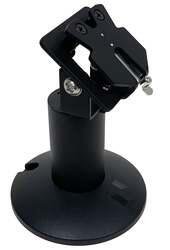
The FlexiPole Drive-Thru Handle fixes that by keeping the terminal locked into a secure grip while the cashier still controls the exchange, then lets it snap back into a wall-mounted holster the second the transaction's done. It's built for Ingenico, Verifone, and PAX terminals, so most drive-thru setups already have a compatible model.
Description
This drive-thru handle is built for the following terminals. Select your exact model on the product page to get the matching backplate.
Ingenico: IPP 320, IPP 350, ICT 220, ICT 250, IWL 220, IWL 250, Lane 3000, Lane 5000, Lane 7000, Lane 8000, Move 3000, Move 5000, Desk 3500, Desk 5000
Verifone: VX 820, P 200, P 400
PAX: S 300, S 80
Accessibility
The FlexiPole Drive-Thru Handle helps eliminate payment terminal risks such as cable damage, dropping, and theft by keeping the cashier firmly in touch with the payment device while presenting it conveniently to the customer in their vehicle.
Once the transaction is complete, the drive-thru handle can be stored neatly on the wall-mounted holster, ready for the next transaction. Installation: The POS drive-thru handle can be mounted to a wall when purchased with the wall mount kit (sold separately). The wall mount requires 5x screws (not supplied).
Wall Mount Sold Separately.
Adaptability
FlexiPole systems provide adaptability with the creation of our individually tailored backplates for your POS device, which allows a quick change if you need to switch your device type.
Security
FlexiPole systems provide a secure solution with the use of the tailored backplate that prevents access to the rear of the card payment machine. The POS Drive-Thru Handle utilises a secure latching mechanism that makes stealing or tampering with the machine extremely challenging. Additional security is provided when purchased with the Wall Mount Kit (available separately) into which is built a tough tether anchor point that can be used with any tether to attach to your payment device.
Installation
The POS drive-thru handle can be mounted to a wall when purchased with the wall mount kit (sold separately). The wall mount requires 5x screws (not supplied).
POS Terminal Not Included.
Frequently Asked Questions
What does the tether anchor point protect against?
It gives you a solid point to attach a tether to your terminal, adding an extra layer of theft prevention. It's built into the wall mount kit.
Why is the backplate tailored instead of universal?
Each backplate matches a specific terminal model, which is what lets it grip the device securely and block access to the rear. Switching terminals later just means The wall mounthe backplate.
Do I need the wall mount kit for the handle to work?
No, the handle works on its own. The kit adds the storage holster and tether anchor point, but it's sold separately.
What hardware do I need for wall-mount installation?
Five screws, which aren't included in the kit. Installation is simple enough for most stores to handle without a professional.
How does the latching mechanism prevent theft?
It secures the terminal firmly in place, making it difficult to remove or tamper with, especially useful since the device is extended outside the building during transactions.
Which terminal models work with this handle?
Ingenico IPP, ICT, IWL, Lane, and Desk series, plus Verifone VX820, P200, P400, and PAX S80 and S300. Select your exact model on the product page for the correct backplate.